If your team still juggles spreadsheets, email threads, and copy-paste jobs just to get content translated, you’re not alone. But there’s a better way. Automated translation integration is the process of connecting your content platforms, like your CMS, code repositories, design tools, or product UI, directly with your translation systems through translation APIs, CAT tools, translation memory, and workflow automation.
According to CSA Research, 76% of consumers prefer to buy products with information in their own language, so your ability to publish accurately and on time, in multiple languages, has quietly become one of the make-or-break factors for a successful global market expansion.
Let’s explore how automation turns translation from a bottleneck into a growth engine.
From Source to Delivery: A Simple Architecture for Multilingual Content
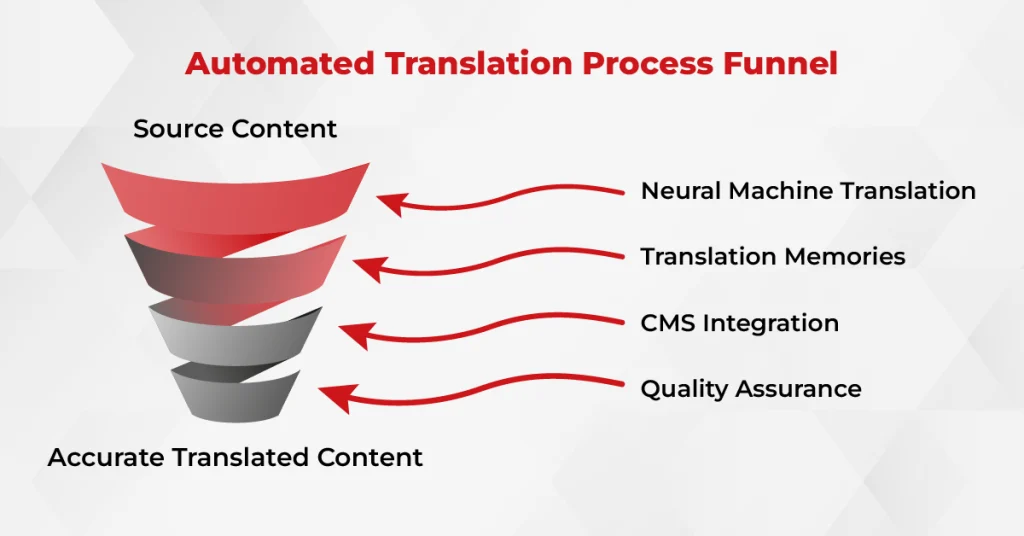
When people hear “automation,” they often imagine something abstract or overly technical. But in localization, automation is practical; it’s what lets your team deliver consistent, on-brand content across 10 or 100 languages without breaking your workflows or budget.
Here’s how the architecture works, simply, but powerfully:
- Connectors & Endpoints:
Your CMS or content source connects to translation APIs—whether in batches or real-time. Webhooks send automated updates about translation status, while message queues and retries keep things stable even when volumes spike. This is where AI-powered translation becomes part of a sustainable strategy.
- Terminology & Translation Memory at Pre-Translate:
Before any linguist touches the content, the system applies your approved terminology management and translation memory (TM). This keeps key phrases, product names, and tone consistent, especially across regions or repeat updates.
- Workflow Automation in the Translation Management System:
You can define rules that route content by market, assign it to editors, or flag it for post-editing and quality assurance automatically. All assets, style guides, TMs, and glossaries stay centralized, so nothing gets lost between teams.
- Delivery Layer:
Once approved, content is pushed back to the CMS or app, ready to go live in every language. For software products, this architecture plugs into your release cycles; for e-commerce, it supports rapid-fire catalog updates and pricing localization.
Choosing the Right Lane: Full Automation vs. Human Checkpoints
Not every piece of content needs the same level of care, and treating them all the same slows everyone down. In a well-structured multilingual workflow, the real skill lies in knowing what to automate and where to slow down and review. This is where smart translation architecture pays off.
Here’s how to make that call with confidence:
1. Go Straight-Through for Low-Risk Content
For simple or high-volume content, like product specs, FAQs, or internal help articles, fully automated workflows work well. Just plug in your machine translation engine, enforce glossaries and TMs, and let the system do the rest. No manual delays.
2. Keep Humans in the Loop for High-Stakes Content
For anything brand-sensitive or compliance-heavy, marketing pages, UI microcopy, legal contracts, or medical documentation, you’ll want experienced linguists reviewing output. For example, UI copy tied to release cycles should follow a structured Software Localization Process to ensure tone and functionality both land right.
3. Post-Editing Levels Matter
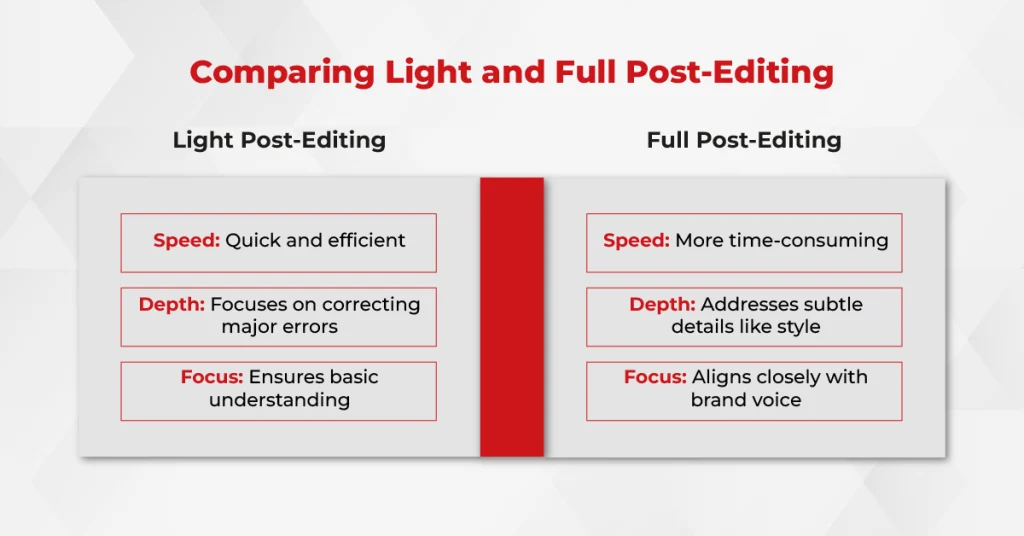
Use light post-editing for quick readability, and full post-editing when accuracy, nuance, or regulatory compliance are critical. The system can route by content type or market priority.
4. Track What Counts
Monitor quality using clear metrics: edit distance, terminology adherence, and categorized errors. Modern dashboards make this visible at a glance.
5. Don’t Skip Security
Glossaries scope sensitive terms and prevent data leakage. Always align your glossary and termbase setup with your vendor’s secure handling policies.
Practical Playbooks: CMS, Product, and Commerce Stacks
Translation integration doesn’t look the same across every team, and it shouldn’t. A marketing site, a SaaS product, and an e-commerce platform all handle content differently. What matters is having a playbook that fits your stack and scales without chaos.
CMS Translation Integration
Trigger translation jobs automatically when pages are published or updated. Locales are mapped, alt text and media are included, and translated entries return fully approved.
→ A solid CMS + TMS integration uses event triggers and progress tracking to cut days off your “ready-to-publish” timelines.
Software Localization Integration
Sync your repo, extract strings (with context or screenshots), apply pre-translation using TM and glossary, then hand off for linguistic review.
→ Once approved, push changes back via PR.
E-commerce Translation Automation
Sync your catalog, including filters, attributes, and pricing units. Automate localization for search facets, product messaging, and price/stock changes in near real time.
→ Use workflow automation to route new product descriptions to the right market reviewers, then publish translated SKUs in minutes.
Term Control That Scales
One glossary per language pair. Enforced during pre-translate. Updated through structured change requests.
→ That’s how you keep product names, legal terms, and UX strings consistent without daily oversight.
Your 6-Step Checklist for Scalable Translation Solutions
You’ve got content flying in from multiple teams, deadlines across time zones, and a growing list of languages to support. What you don’t need is a messy translation process that breaks every time something scales.
These six steps will help you build that foundation.
1. Inventory Your Content and Language Needs
Start by listing what you’re translating: types of content, source systems, supported locales, and language pairs. Then set clear rules, what can go through fully automated, and what needs human review.
4. Connect Your CMS or App to Translation APIs
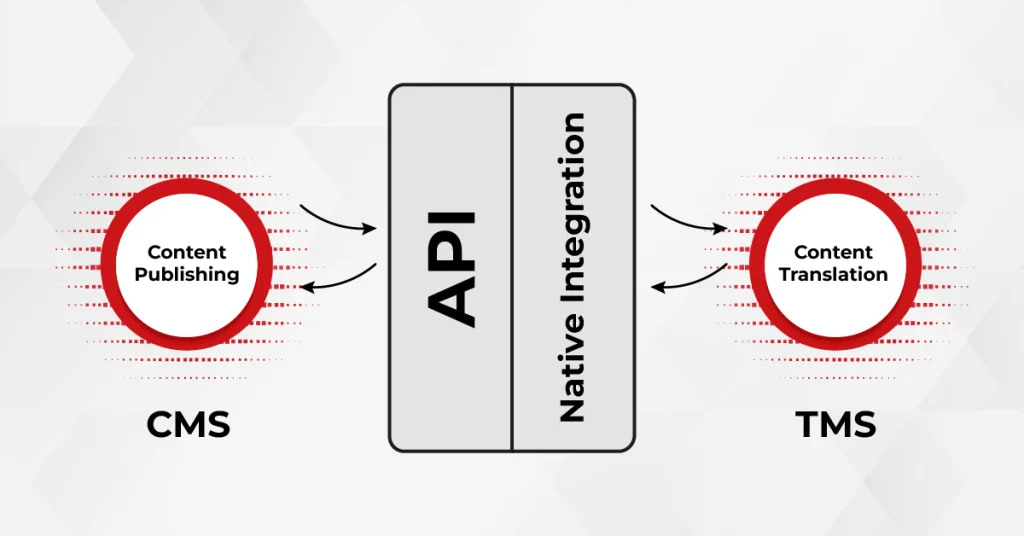
Set up API integrations that trigger jobs when content is created or updated. Test both batch jobs and real-time submissions to make sure the connection is stable and returns clean results.
3. Set Up Translation Memory and Terminology Management
Before you send anything for translation, upload your TM and approved glossary. These tools reduce repetition, cut costs, and keep brand language consistent across markets.
4. Define Post-Editing Thresholds
Not everything needs the same level of review. Decide which content requires minimal post-editing for clarity and which needs a full review, such as legal, product UI, or campaign content.
5. Add QA Checks Before Publishing
Build in automated checks for formatting, terminology adherence, broken links, and placeholder issues, so you catch problems before they go live.
6. Track Performance and Improve Over Time
Keep an eye on turnaround times, error rates, and rework. Use those insights to tweak workflows, improve quality, and stay ahead of scaling challenges.
As companies expand across borders, the ability to publish multilingual content quickly, consistently, and accurately becomes part of how they operate. That’s where automation earns its place.
At AsiaLocalize, we’ve spent over a decade helping businesses, from fast-growing startups to global enterprises, build translation workflows that actually work. With thousands of successful projects behind us, we can make localization a strength. Let’s build the system that gets you there without any surprises and bumps.
Raw MT? We’ll Make It Market-Ready.