

Translation testing is an in-context quality check that verifies translated content is accurate, complete, natural, and usable before launch. Reviewers test the copy inside the website, app, document, or interface where users will see it—not only inside a spreadsheet or CAT tool.
A translation can be linguistically correct and still fail in production. Text may overflow a button, a placeholder may break, Arabic content may display in the wrong direction, a Japanese form may reject valid names, or a localized page may point to the wrong URL. These failures damage trust and conversion even when the words themselves are correct.
This practical pre-launch guide explains the difference between translation, localization, and internationalization testing; provides a reusable checklist; and shows how to document, prioritize, fix, and retest multilingual issues.
What Is Translation Testing?
Translation testing focuses on the translated content in context: meaning, completeness, terminology, grammar, tone, placeholders, and whether the copy remains understandable and usable in the final interface. It is normally performed by native-language reviewers with access to the source and approved terminology.
When teams also validate layouts, locale-aware formats, navigation, input rules, payments, and technical behavior, the work overlaps with broader localization testing. Defining the scope before testing prevents gaps, duplicate effort, and unclear ownership.
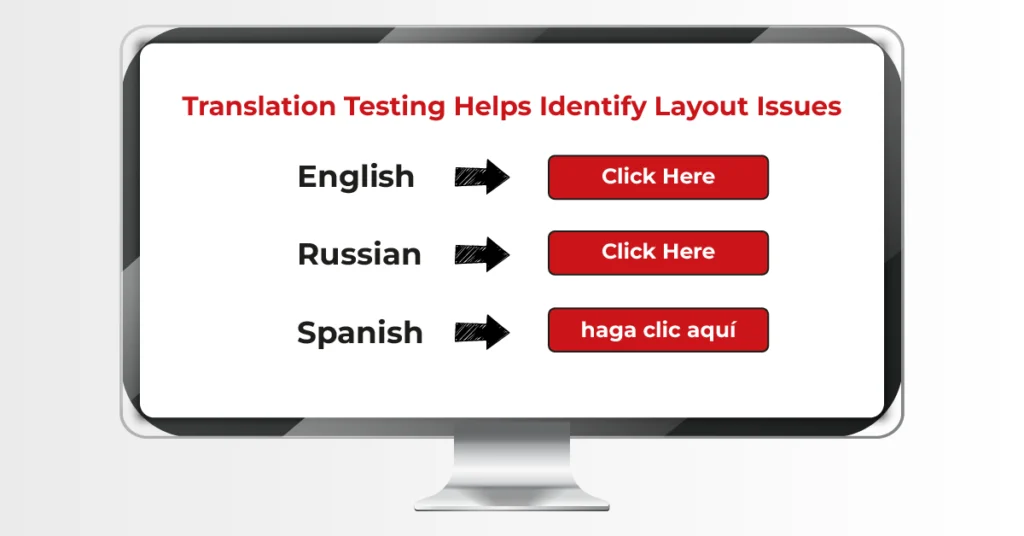
A comprehensive translation testing process typically verifies:
- Language accuracy, ensuring translations reflect the original meaning while sounding natural to native speakers.
- Terminology consistency, so product names, industry terms, and brand messaging follow an approved terminology management system.
- Cultural relevance, confirming that examples, visuals, colors, and expressions resonate with local audiences.
- Page layout and visual presentation, making sure text expansion or contraction doesn’t disrupt the design.
- User interface (UI) behavior, including menus, navigation, dialogs, and interactive components.
- Forms, buttons, and user journeys, ensuring every action functions correctly from start to finish.
- Links and navigation, so localized pages connect users to the right destinations.
- Metadata and hreflang implementation, helping search engines serve the correct language and regional version of your content.
- Readability across desktop, tablet, and mobile devices, where layouts often behave differently.
A simple way to think about it is this:
Proofreading checks the text. Translation testing checks the experience.
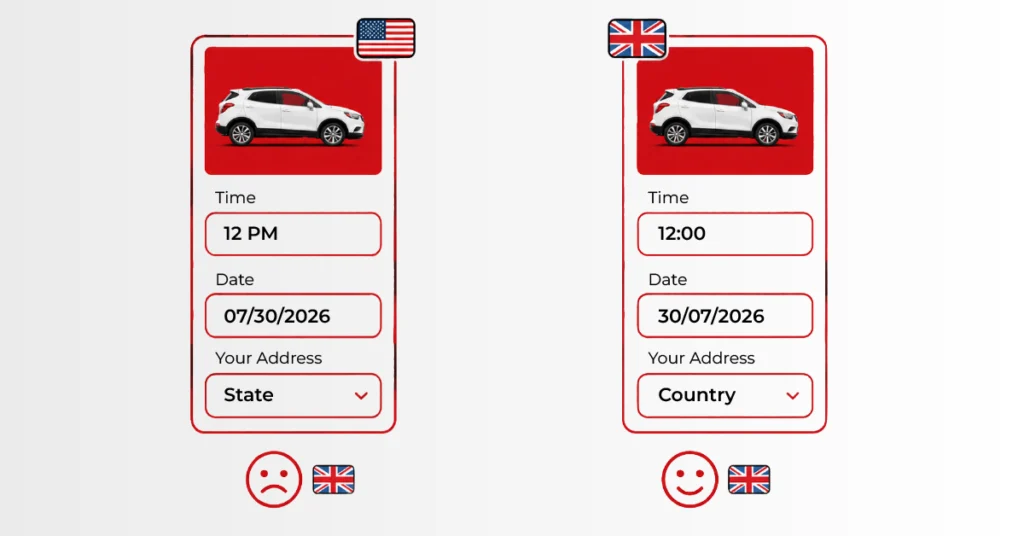
Translation Testing vs. Localization Testing: What’s the Difference?
The terms translation testing and localization testing often appear interchangeably, but they describe two different stages of quality assurance. Understanding where one ends and the other begins helps teams choose the right process and avoid costly gaps before launch.
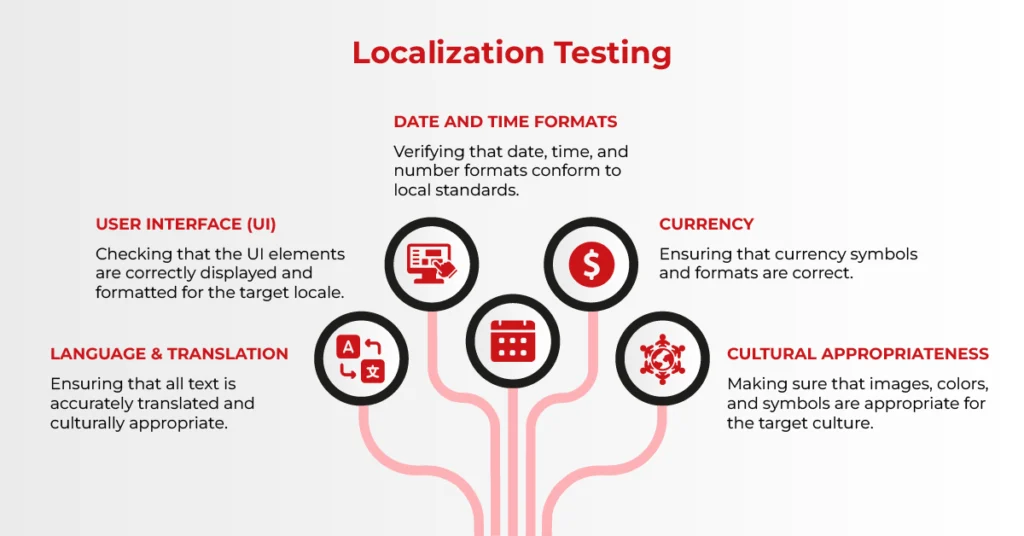
The comparison becomes much clearer when viewed side by side.
| Area | Translation Testing | Localization Testing | Internationalization Testing |
| Core question | Is the translated content correct and natural in context? | Does the complete product work for this locale? | Can the underlying product support multiple locales? |
| Typical checks | Meaning, grammar, terminology, tone, completeness, placeholders, and context | Language, layout, functions, formats, culture, accessibility, and user journeys | Externalized strings, Unicode, text expansion, RTL readiness, locale APIs, and fallback logic |
| Timing | After translation is available in a testable context | Per locale on staging or a release candidate | During design and development, before large-scale translation |
| Primary owners | Native linguists and language leads | Linguists, QA, design, engineering, product, and regional stakeholders | Engineering, QA, design systems, and localization engineering |
| Output | Linguistic issue log and approved corrections | Locale-readiness report and release decision | Internationalization defect log and reusable technical fixes |
The easiest way to remember the difference is this:
- Translation testing asks: “Does the translated content read naturally and work correctly?”
- Localization testing asks: “Does this entire product feel like it was built for this market?”
Solid Translation Testing Starts with Strong QA
Every successful translation testing process starts with translation quality assurance (QA), the discipline that ensures translated assets meet linguistic and brand standards before in-context testing begins.
Translation quality assurance verifies that the content faithfully reflects the source while remaining clear and consistent for the target audience. By resolving linguistic issues early, QA allows the testing phase to focus on how the content performs in its final environment rather than correcting problems that should have been addressed much earlier.
A thorough translation QA process typically reviews:
- Grammar, spelling, and punctuation to ensure polished, professional communication.
- Terminology consistency, confirming approved glossaries and product names are used uniformly across all content.
- Missing or incomplete translations, including untranslated strings, placeholders, and fallback text.
- Mistranslations, where the wording may be grammatically correct but fails to preserve the original meaning or intent.
- Tone and register, ensuring the content aligns with the brand voice while meeting the expectations of the local audience.
- Formatting consistency, including capitalization, spacing, lists, special characters, and text styling.
- Numbers, units, currencies, dates, and measurements, adapting them to regional conventions without compromising accuracy.
- Source-to-target alignment, verifying that no information has been added, omitted, or unintentionally altered during translation.
Pre-Launch Translation Testing Checklist
Use the following checklist as release evidence rather than treating testing as an informal read-through. Mark every item pass, fail, not applicable, or blocked, and record the responsible owner.
| Testing Layer | What to Verify |
| Linguistic and content | Accuracy, omissions, tone, terminology, capitalization, punctuation, links, legal copy, and untranslated strings |
| Variables and language rules | Placeholders, HTML tags, plural and gender forms, ICU messages, concatenated strings, truncation, and fallback text |
| UI and visual | Text expansion, wrapping, clipping, fonts, diacritics, line breaks, icons, images, mobile layouts, and RTL mirroring |
| Locale formats | Dates, times, time zones, calendars, numbers, decimal separators, currencies, units, addresses, phone numbers, and names |
| Functional behavior | Navigation, forms, validation messages, search, sorting, filters, downloads, email notifications, payments, and error states |
| SEO and accessibility | Localized titles and descriptions, hreflang, canonicals, language attributes, alt text, keyboard access, labels, and screen-reader order |
| Release and analytics | Locale routing, consent flows, analytics events, regional endpoints, browser/device coverage, open defects, rollback, and approval |
Use Pseudolocalization Before Real Translation
Pseudolocalization replaces source strings with accented, expanded, or bidirectional test text before translators begin. It exposes hard-coded copy, undersized containers, encoding failures, broken placeholders, and incomplete RTL support while fixes are still inexpensive.
Microsoft’s internationalization guidance recommends reviewing code and source UI, testing a pseudolocalized build, and then piloting a small set of languages. Select representative stress locales: a language with longer strings, an RTL language such as Arabic, and a CJK language such as Japanese or Chinese.
What Should Be Automated—and What Needs Human Review?
Automation is effective for repeatable checks: missing resource keys, placeholder mismatches, forbidden terms, character limits, locale-format unit tests, screenshots, link validation, visual diffs, and regression suites. Run these checks in the delivery pipeline whenever source content or code changes.
Human reviewers remain essential for meaning, fluency, tone, cultural fit, ambiguity, visual context, and whether a user journey feels natural. The strongest model combines automated defect detection with native in-context review and clear release ownership.
A Practical Translation Testing Workflow That Catches Issues Before Launch
Effective translation testing rarely happens by chance. The most successful localization teams follow a structured workflow that combines linguistic expertise, technical validation, and collaborative review.
While every organization adapts the process to its own products and release cycles, the core workflow remains remarkably consistent.
1. Prepare the Source and Localized Assets
Successful testing starts with preparation. Before anyone begins reviewing content, gather everything needed to evaluate the localized experience in context.
This typically includes:
- Source content
- Translated content
- Screenshots or staging environments
- Website URLs or application builds
- Design files
- Approved glossary and terminology database
- Style guide
- Market-specific requirements and localization notes
2. Build a Translation Testing Checklist
A well-designed checklist creates consistency across languages, reviewers, and release cycles. Rather than relying on memory, teams work through a standardized set of quality criteria that leaves far less room for oversight.
A comprehensive checklist should cover:
- Linguistic accuracy
- Terminology consistency
- Formatting and text expansion
- User interface and layout
- Functional behavior
- SEO elements, including metadata and hreflang
- Cultural appropriateness
- Accessibility where applicable
3. Review the Translation in Its Real Environment
This is where translation testing differs from a traditional linguistic review.
A translation that looks flawless inside a CAT tool or spreadsheet can behave very differently once it appears on a live webpage, mobile screen, or software interface. Text may overflow containers, break navigation, hide behind images, or lose meaning when separated from its surrounding context.
Reviewing the translation where users will actually encounter it allows teams to identify issues that would otherwise remain invisible until after launch.
4. Combine Linguistic, Functional, and Visual QA
Translation testing works best as a collaborative effort rather than a single review pass.
Each specialist brings a different perspective:
- Native-language reviewers evaluate fluency, terminology, tone, and cultural appropriateness.
- QA testers validate functionality, navigation, forms, links, buttons, and interactive elements.
- Designers and developers resolve layout issues, text expansion, responsive behavior, and interface consistency.
Together, these reviews provide confidence that the localized experience performs as well as it reads.
5. Document Issues with Clear Bug Reports
Clear documentation ensures bugs are resolved efficiently.
Every bug report should include:
- The affected page or screen
- Target language or locale
- Issue category
- Description of the problem
- Screenshot or screen recording
- Expected behavior
- Severity and release priority
- Steps to reproduce, build, device, browser, and operating system
- Suggested correction, assignee, status, and retest result
Use consistent severity rules: critical blocks a core journey or creates legal or safety risk; high materially changes meaning or prevents task completion; medium harms clarity, layout, or trust but has a workaround; and low is cosmetic. Define release acceptance criteria before testing so teams know which defects must be closed and which can be documented for a later release.
6. Retest Before Release
Every fix should be verified to confirm that the original issue has been resolved without introducing new ones elsewhere in the product. This final validation helps prevent regressions and ensures the localized experience remains stable across devices, browsers, and supported languages.
Skipping this final review often turns a solved problem into a new one.
Translation Testing FAQs
What is translation testing?
Translation testing verifies translated content in context for accuracy, completeness, terminology, tone, placeholders, and usability before release.
How is translation testing different from proofreading?
Proofreading reviews the text itself. Translation testing checks that the approved text remains correct and understandable inside the final page, screen, document, or user journey.
When should translation testing happen?
Run it when translated content is available in a stable staging environment, leave time for corrections, and retest the release candidate after fixes.
Who should perform translation testing?
Native linguists should own language decisions, supported by QA testers, developers, designers, product owners, and regional stakeholders for technical and market issues.
What languages should be tested first?
Prioritize high-traffic or high-risk markets and include stress locales that exercise long text, RTL layouts, complex scripts, and different regional formats.
Can translation testing be automated?
Many structural and regression checks can be automated, but meaning, tone, cultural fit, ambiguity, and contextual usability still require qualified human review.
Catch Issues Before Your Customers Do
A polished translation is only part of a successful launch. What your customers ultimately experience is the entire journey, from the first page they land on to the final click at checkout.
At AsiaLocalize, our localization services combine native linguistic review, technical validation, and structured reporting across websites, software, mobile experiences, and multilingual content.
Give Every Market a Native Experience.
Explore our localization services and plan a pre-launch testing scope for your priority markets.