Last updated: October 2026.
Translation workflow automation is the use of connectors, APIs and a translation management system (TMS) to move content from where it is created—a CMS, code repository, PIM or help center—through translation, review and testing, then back again, without manual exports, spreadsheets or copy-and-paste handoffs.
Automation does not remove people from localization. It handles the predictable movement and checks, so linguists, engineers, marketers and regional reviewers spend their time on decisions that need judgment. That matters because buyers expect their own language: in a 2020 CSA Research survey, 76% of online shoppers said they prefer products with information in their own language.
This guide covers the architecture, integration models, quality gates, security controls, KPIs and a 10-step launch plan, plus what changes when your target markets include Asian languages.
Key takeaways
- Automate the movement, not the judgment: connectors and APIs handle detection, routing and delivery; people review high-risk content.
- Pick the simplest integration that fits: a native connector for a standard CMS, a custom API for proprietary systems, CI integration for software.
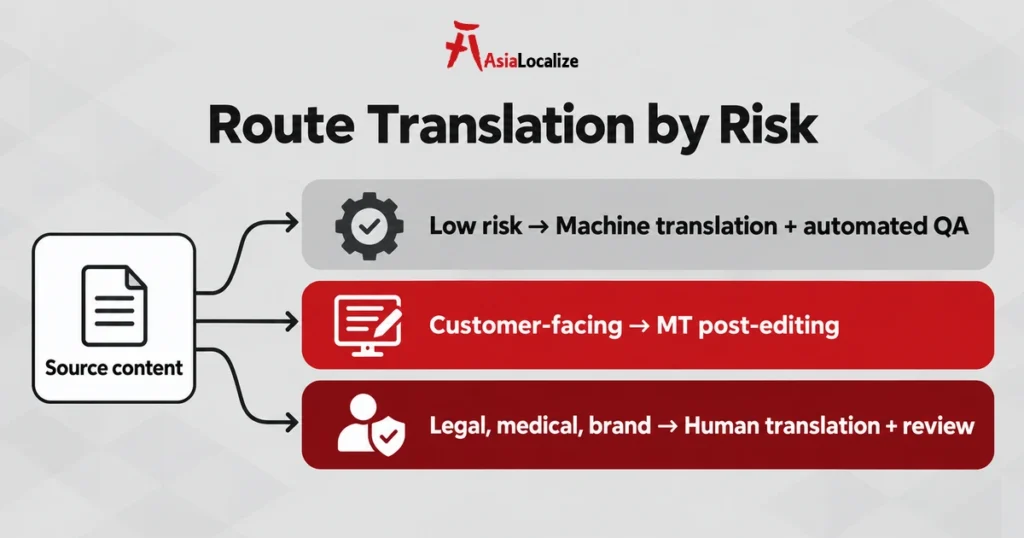
- Route by risk: machine translation for low-impact content, MT post-editing for customer-facing text, full human translation for legal, medical and brand content.
- Engineer for failure: stable IDs, idempotency, queues, retries and rollback stop duplicate or wrong-locale publishing.
- Plan for Asian scripts early: word segmentation, locale codes, fonts and formality rules need language-aware checks.
How Does Translation Workflow Automation Work?
Translation workflow automation has six parts: a source system, a trigger, TMS orchestration, quality checks, delivery and monitoring.
- Source: a CMS, repository, PIM, support platform, or content database creates or changes content.
- Trigger: a connector, API, webhook, scheduled scan, or CI event submits only eligible content.
- Orchestration: the TMS applies locale mapping, translation memory, terminology, machine translation, and routing rules.
- Quality: automated QA and risk-based human review verify language, tags, variables, formatting, and context.
- Delivery: approved translations return to the correct locale, branch, entry, or catalog record.
- Monitoring: dashboards and alerts track failures, quality, cost, throughput, and time to publish.
What Are the Stages of an Automated Translation Workflow?
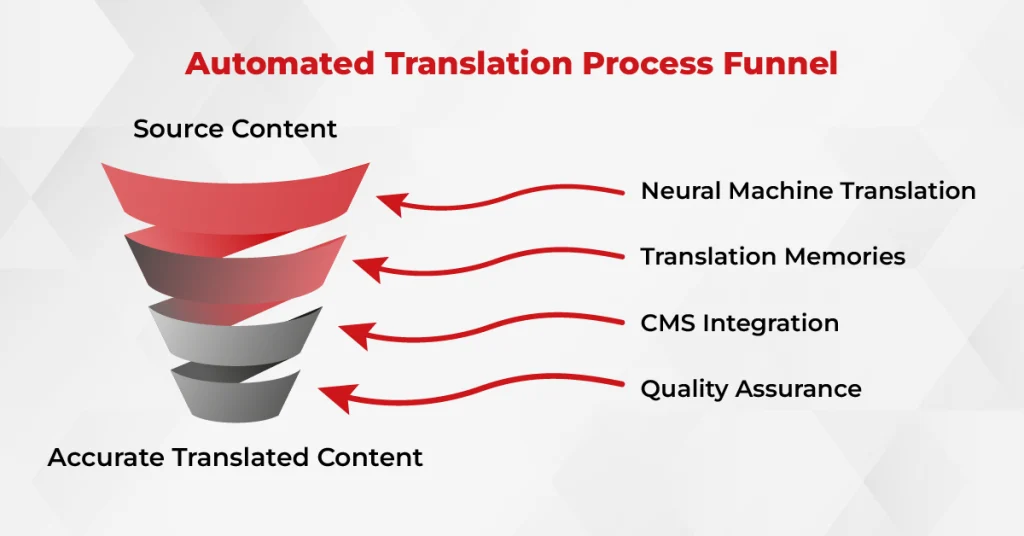
Most translation workflow automation projects follow five stages, from detecting changed content to publishing approved translations and feeding corrections back into language assets.
Stage 1: Content Source and Change Detection
The workflow begins where content is authored. Define which entries, fields, files, branches, or SKUs are translatable and what event makes them eligible. A page moving to “ready for translation” is safer than sending every saved draft. Delta synchronization should submit changed content instead of retranslating complete assets.
Stage 2: Extraction and Normalization
The integration extracts text while preserving IDs, hierarchy, tags, placeholders, formatting, and relationships to images or child assets. Good segmentation matters: it influences translation-memory reuse, linguistic context, and whether translated content can be placed back into the source system correctly.
Stage 3: TMS Orchestration and Pre-Translation
The translation management system creates jobs, maps source and target locales, applies translation-memory matches, enforces terminology, and selects a machine-translation or human workflow. Business rules can route content by risk, market, format, visibility, or subject matter.
Stage 4: Translation, Review, and Quality Gates
Low-risk repetitive content may use machine translation with automated checks and sampling. Customer-facing or specialized content typically needs professional machine translation post-editing. Legal, medical, regulatory, and high-visibility brand content requires qualified human translation and independent review.
Stage 5: Delivery, Publication, and Feedback
Only approved content should move to production. The integration returns translations to the correct page, locale, repository branch, or product record, then records the release result. Validated corrections feed translation memories, termbases, style guidance, and routing rules so later cycles improve.
Which Integration Model Should You Choose?
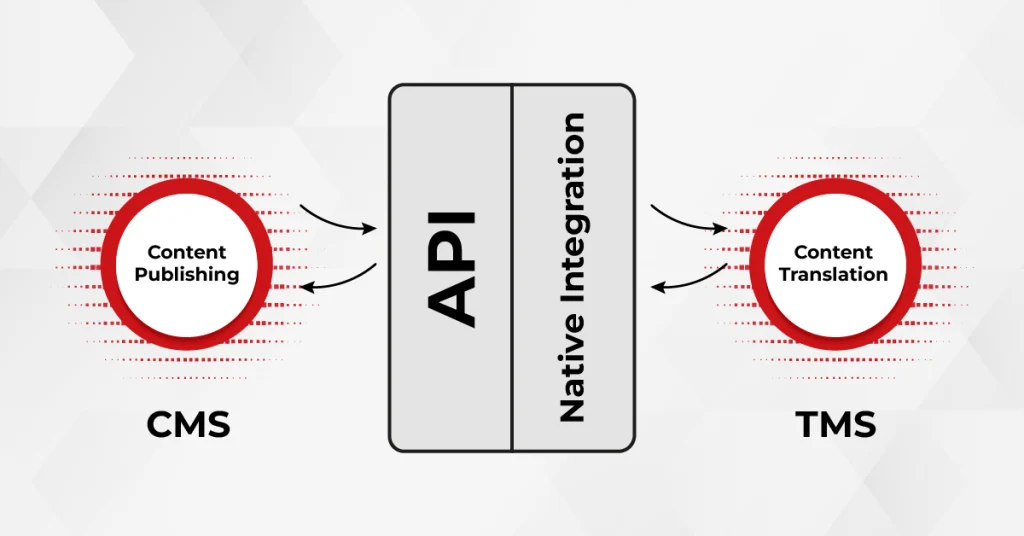
Choose the simplest model that meets your content, security and release needs. A native connector is usually enough for a standard CMS; a custom API pays off when the source system has unique content relationships, approval states or downstream dependencies.
| Integration model | Best for | Main trade-off |
|---|---|---|
| Native connector or plugin | Common CMS, PIM, support, and marketing platforms | Fast deployment but limited to supported fields and platform behavior |
| Custom API integration | Proprietary systems and complex routing | Maximum control with higher engineering and maintenance effort |
| Repository and CI integration | Software, apps, documentation, and localization files | Fits developer releases but requires careful branching and merge rules |
| Website translation proxy | Rapid multilingual website deployment | Quick delivery but less control over source content architecture |
| Over-the-air delivery | Frequently updated app or digital-product strings | Fast updates require strong versioning, fallback, and release governance |
Which Content Still Needs Human Review?
Route content by risk, not by format. Low-impact, repetitive text can run on machine translation with automated checks; customer-facing content needs post-editing; legal, medical, regulatory and brand-critical content needs qualified human translation and independent review.
| Content profile | Recommended route | Release control |
|---|---|---|
| Temporary internal content with low business impact | Automated translation or light post-editing | Automated QA plus periodic sampling |
| Support content, catalogs, and knowledge bases | MT with full post-editing | Terminology QA and reviewer approval |
| UI strings and product documentation | MTPE or human translation | In-context linguistic and functional testing |
| Marketing and brand campaigns | Human localization or transcreation | Regional and brand approval |
| Legal, medical, financial, and safety content | Qualified human translation | Independent review and documented sign-off |
Weigh business impact, audience, confidentiality, language-pair quality and shelf life when you set routing rules. Our guide to machine translation errors explains why fluent machine output still needs these controls.
What Technical Controls Make Translation Integrations Reliable?
Five controls prevent most integration failures: stable IDs with explicit locale mapping, duplicate prevention, queued event handling, safe retries, and version checks with rollback.
Stable Identifiers and Locale Mapping
Preserve stable content IDs so returned translations cannot attach to the wrong asset. Explicitly map locale codes such as en-US, fr-FR, and zh-Hant-TW; do not assume that every system uses the same format or regional fallback.
Idempotency and Duplicate Prevention
An event may be delivered more than once. Use idempotency keys, source revision IDs, and job-state checks so retries do not create duplicate projects, overwrite newer content, or publish the same translation repeatedly.
Webhooks, Polling, and Queues
Webhooks or callbacks provide fast event notification, while scheduled polling offers a fallback when an event is lost. Keep webhook handlers lightweight, acknowledge valid events quickly, and place processing on a queue. Separate ingestion from translation and publication so a temporary outage does not lose content.
Retries, Backoff, and Dead-Letter Handling
Retry recoverable network failures and rate-limit responses using exponential backoff and jitter. Do not retry authentication failures or invalid content indefinitely. Move exhausted jobs to a dead-letter queue or exception dashboard with enough information for a person to diagnose and safely replay them.
Versioning, Conflict Detection, and Rollback
Store the source revision used for translation and compare it at delivery time. If the source changed during review, flag the translation instead of silently overwriting the update. Keep a previous approved version and a rollback path for every production locale.
How Do You Keep Automated Translation Secure?
Glossaries improve terminology; they do not prevent data leakage. A secure translation workflow requires controls across identity, transmission, storage, and vendor management.
- Use service accounts, short-lived credentials, and least-privilege scopes instead of personal access tokens where possible.
- Store secrets in an approved secret manager and rotate them on a defined schedule.
- Encrypt content in transit and at rest; validate signed webhook requests.
- Classify confidential, regulated, and embargoed content before routing it to MT or AI services.
- Define retention, deletion, data-residency, subprocessors, and model-training terms contractually.
- Keep audit logs for submission, review, approval, publication, and administrative changes.
What Does Translation Automation Look Like in Practice?
Three playbooks cover most business content: CMS and marketing pages, software repositories, and e-commerce product data.
CMS and Marketing Content
A page enters a translation-ready state. The connector exports approved fields, SEO metadata, alt text, related media, and page relationships. The TMS applies the market workflow. Approved translations return as locale-linked drafts, where local owners verify preview and navigation before publication.
Software and Repository Localization
A pull request changes resource files. CI validates the format, extracts new or changed keys, and submits them with branch, screenshot, and character-limit context. Translations return in a controlled commit or pull request. Automated tests check missing keys, placeholders, encoding, and build integrity before merge. The complete software localization process should include internationalization and in-context testing, not translation alone.
E-commerce and PIM Automation
New or updated SKUs trigger translation of names, descriptions, attributes, filters, and image metadata. Brand and regulated claims receive review, while repetitive attributes follow an automated route. Delivery respects market assortment and locale-specific units. Validation prevents untranslated attributes, broken facets, and stale source revisions from reaching the storefront.
How Do You Implement Translation Workflow Automation in 10 Steps?
Start small: prove your translation workflow automation on one source system and a few locales, then expand. These ten steps take you from inventory to a measured pilot.
- Inventory systems and content: record owners, formats, volumes, locales, release frequency, and dependencies.
- Classify risk: define which content can use MT, MTPE, or human translation.
- Select the integration model: connector, API, repository sync, proxy, or OTA delivery.
- Define the content contract: IDs, fields, locale mapping, states, metadata, assets, and deletion behavior.
- Prepare language assets: translation memories, glossaries, style guides, context, and do-not-translate rules.
- Design routing and approvals: document human checkpoints, market owners, escalation, and publishing authority.
- Build reliability and security: authentication, queues, retries, logging, monitoring, and rollback.
- Test with representative content: include difficult formats, long strings, RTL languages, CJK scripts, and partial failures.
- Pilot a limited release: start with one source system and a small set of contrasting locales.
- Measure and improve: review operational and quality data before expanding scope.
Use the broader localization workflow framework to define ownership and handoffs, then validate the production result with a translation testing checklist.
Which KPIs Show Translation Automation Is Working?
Measure translation workflow automation on speed, reliability and quality together. A faster workflow that ships more errors is not an improvement.
- Automation rate: percentage of eligible assets processed without manual file handling.
- Cycle time: time from source approval to translated content ready for release.
- Integration failure rate: failed submissions, callbacks, deliveries, and publications.
- First-pass yield: percentage passing linguistic and technical QA without rework.
- Terminology compliance: adherence to approved terms by locale and content type.
- Cost per asset or word: measured alongside quality and turnaround—not in isolation.
- Localization freshness: delay between source updates and synchronized target versions.
What Are the Most Common Translation Integration Mistakes?
Most translation workflow automation failures come from process and data gaps rather than the translation engine itself.
- Automating a broken manual process before defining ownership and approval states.
- Sending every edit instead of content explicitly approved for translation.
- Ignoring locale-code differences, related assets, or source revisions.
- Publishing pending or partially reviewed translations to production.
- Depending on webhooks without polling or manual recovery.
- Retrying requests without idempotency, backoff, or rate-limit controls.
- Providing strings without screenshots, metadata, or product context.
- Measuring speed and cost while ignoring error severity and downstream rework.
What Changes When You Automate Translation for Asian Languages?
Asian languages add technical and linguistic checks to translation workflow automation that English-first setups often miss. Build them into the content contract and QA rules before launch.
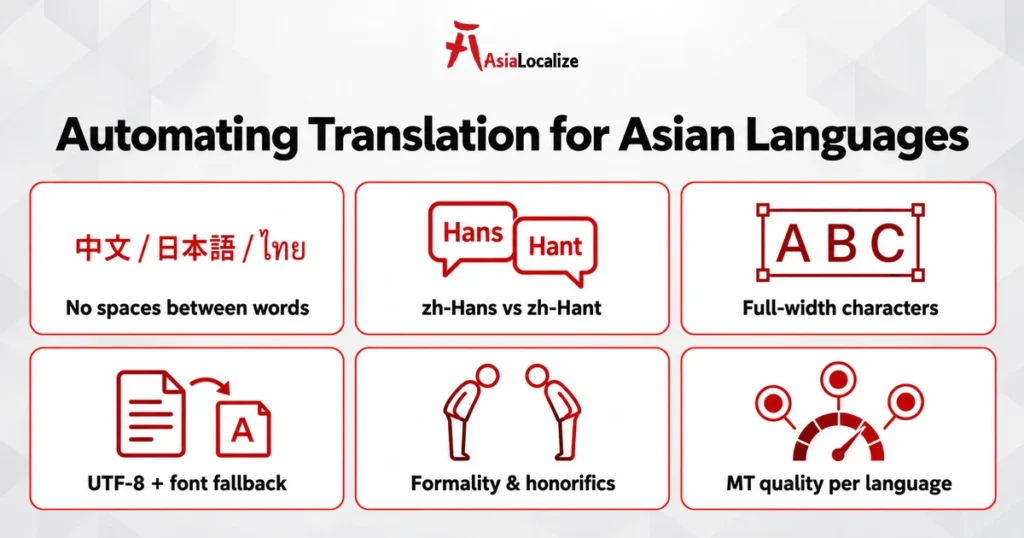
- Word segmentation: Chinese, Japanese and Thai are written without spaces between words, so word counts, translation-memory matching and line breaking need language-aware tools. Many teams quote and set length limits by character instead.
- Locale and script codes: map script and region explicitly, such as zh-Hans for Simplified Chinese, zh-Hant-TW and zh-Hant-HK for Traditional Chinese markets, plus ja-JP, ko-KR, th-TH, vi-VN and id-ID, instead of relying on a generic “zh” fallback.
- Display width: a full-width CJK character takes more space than a Latin letter, so UI length checks should measure rendered width, not only character count.
- Encoding and fonts: enforce UTF-8 end to end and test font fallback for complex scripts such as Thai, Khmer and Myanmar. Myanmar content can still arrive in legacy Zawgyi encoding and must be converted to Unicode.
- Formality and honorifics: Japanese keigo, Korean speech levels and Thai polite particles change with the audience, so route customer-facing and brand content to native reviewers.
- Machine translation quality by language pair: benchmark engines for each Asian language before allowing light post-editing, because output quality varies widely between pairs.
AsiaLocalize runs ISO 17100-certified workflows in 120+ languages, with native linguists for the Asian markets your integration serves.
Frequently Asked Questions
What is translation workflow automation?
It is the automated movement of content from its source system into translation, review, quality assurance, and delivery. It uses connectors, APIs, repositories, webhooks, and TMS rules to reduce manual handling.
Which systems can you connect to a translation management system?
Most TMS platforms connect to content management systems, code repositories, PIM and e-commerce platforms, help centers and design tools through native connectors, APIs or file-based sync. Proprietary systems usually need a custom API integration.
What is the difference between a connector and a translation API?
A connector is a prebuilt integration for a supported platform. An API allows a team to build custom behavior for proprietary systems, specialized content models, or complex workflow rules.
Can translation be completely automated?
The technical flow can be highly automated, but not every content decision should be. High-impact, regulated, creative, or context-sensitive content still requires qualified human review and clear publishing accountability.
How do webhooks support translation automation?
Webhooks notify an integration when an event occurs, such as a completed translation. Reliable implementations validate the request, acknowledge it quickly, process it asynchronously, prevent duplicates, and use polling as a fallback.
How should an automated localization workflow be secured?
Use least-privilege service accounts, managed secrets, encryption, signed events, audit logs, access reviews, and documented retention and data-processing rules. Confidential content should only enter approved services.
How do you measure whether translation automation works?
Track automation rate, cycle time, failure rate, quality defects, terminology compliance, rework, cost, and localization freshness. Evaluate results by content type and locale rather than relying on one overall average.
Does translation workflow automation work for Asian languages?
Yes, with language-aware settings: correct script and locale codes, character-based length limits, UTF-8 encoding, font testing for complex scripts and native review for formality. Benchmark machine translation separately for each Asian language pair.
Build a Workflow That Scales Without Losing Control
Successful translation workflow automation is not a single API call. It is a governed system that connects content, language assets, people, quality gates, and release controls. The strongest implementations remove repetitive handoffs while keeping human expertise exactly where errors carry the greatest cost.
AsiaLocalize helps organizations design secure, scalable workflows that combine integrations, machine translation, terminology management, professional linguists, and multilingual QA. Explore our machine translation and AI services, strengthen automated output with professional MTPE services, or contact our team to plan your integration.